AI Assistant Configuration
Overview
The AI Assistant in Voicing AI is a comprehensive conversational AI entity that handles customer voice interactions. The assistant configuration is organized into 8 main tabs, each controlling different aspects of the assistant's behavior, capabilities, and integration.
Assistant Flow Modes
An assistant can operate in two distinct modes:
- Prompt Mode: Uses a single, comprehensive prompt to guide conversations
- Pathways Mode: Uses structured conversational pathways (flowcharts) for step-by-step conversations
Important: When using Pathways mode, the assistant-level prompt is not required. The prompts are defined within the pathway nodes instead.
Table of Contents
- Basic Settings
- Prompt
- TTS Controls
- STT Controls
- Orchestration
- Tools & KB
- Post-Call Analysis
- Advance Settings
- Inbound Calls
- Chatbot
- Complete Examples
1. Basic Settings
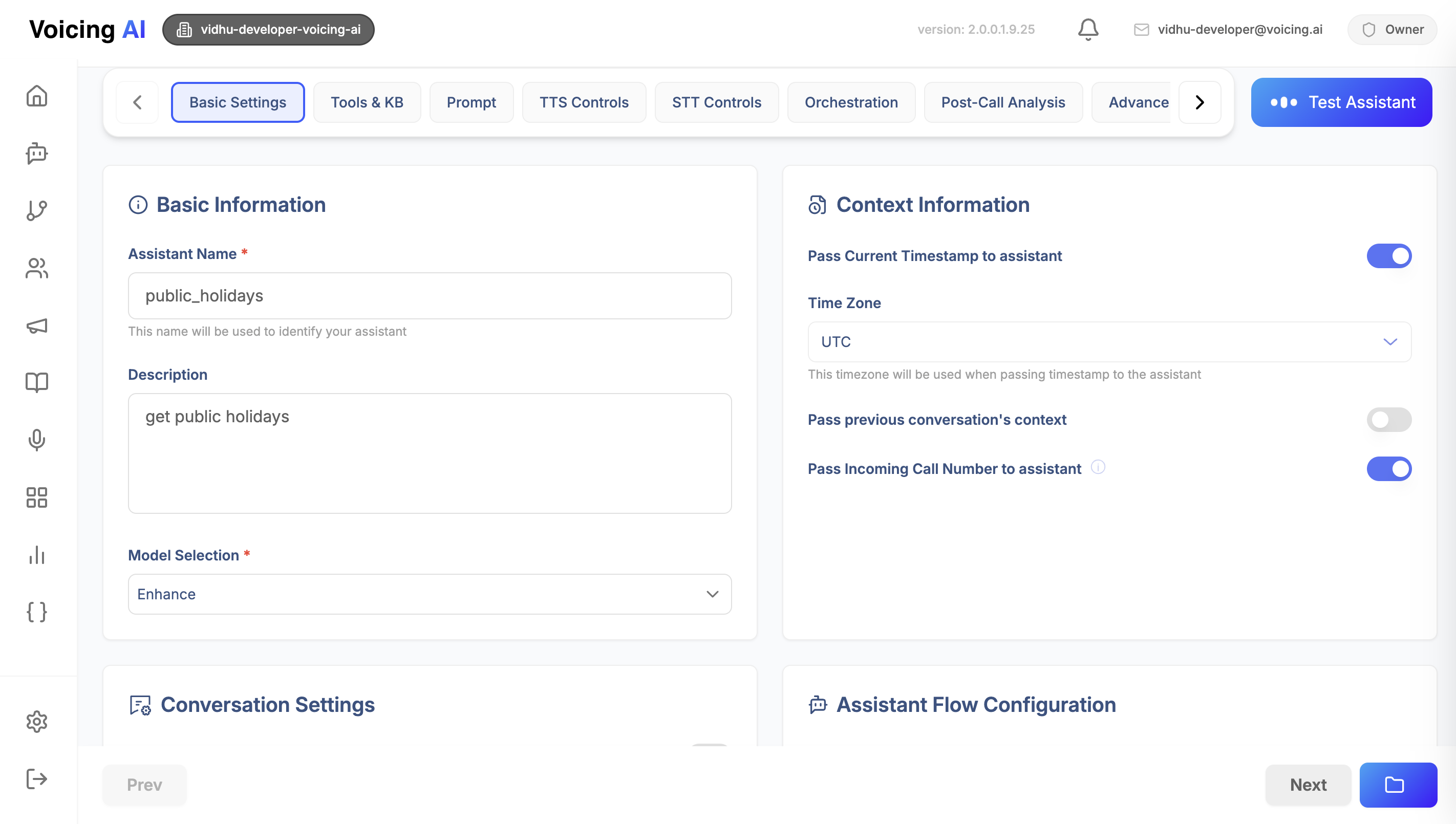
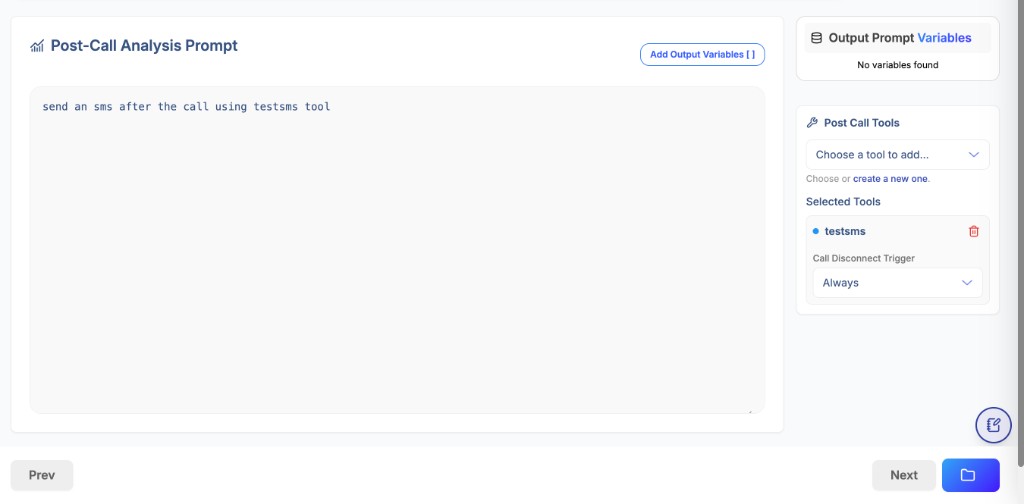
The Basic Settings tab contains fundamental information about your assistant and how it should behave.
1.1 Basic Information
Fields:
name(required): Unique identifier for your assistantdescription(optional): Human-readable description of the assistant's purposemodel_selection(required): UUID of the LLM model to use (e.g., "default" model)
Example:
{
  "basic_info": {
    "name": "customer_support_assistant",
    "description": "Handles customer support inquiries and ticket creation",
    "model_selection": "019bb7a2-bc4f-7f09-a79c-2d6445d2811f"
  }
}
1.2 Conversation Settings
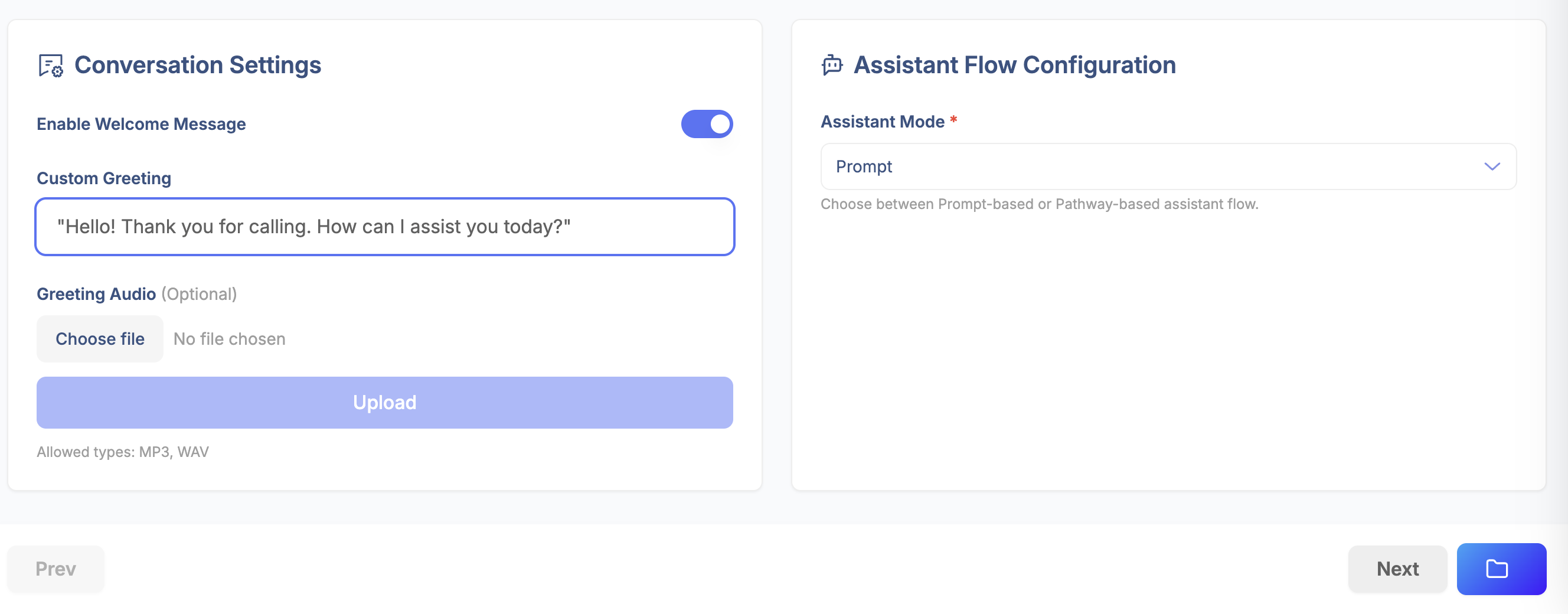
Controls how the assistant greets and converses with callers.
Fields:
enable_welcome_message(boolean): Whether to play a welcome messagecustom_greeting(string): Custom greeting text to speakconversation_style(string): Style of conversation - "Professional", "Casual", "Friendly", "Formal", "Enthusiastic"custom_greeting_audio_base64(string): Base64-encoded audio file for custom greetingcustom_greeting_audio_file_path(string): Path to uploaded audio file
Example:
{
  "conversation": {
    "enable_welcome_message": true,
    "custom_greeting": "Hello! Thank you for calling. How can I assist you today?",
    "conversation_style": "Professional",
    "custom_greeting_audio_file_path": "uploads/greetings/welcome_audio.wav"
  }
}
1.3 Context Information
Defines what contextual data is passed to the assistant during conversations.
Fields:
include_current_timestamp(boolean): Pass current timestamp to assistanttimezone(string): Timezone for timestamp (e.g., "UTC", "America/New_York")include_call_from(boolean): Include caller's phone numberinclude_location(boolean): Include caller's location if availableprevious_context: Settings for including previous conversation historyinclude_previous_context(boolean): Enable previous contextprevious_history_days(integer): Number of days of history to include
Example:
{
  "context_info": {
    "include_current_timestamp": true,
    "timezone": "America/New_York",
    "include_call_from": true,
    "include_location": false,
    "previous_context": {
      "include_previous_context": true,
      "previous_history_days": 7
    }
  }
}
1.4 Assistant Flow Configuration
Critical Section: Determines whether the assistant uses Prompt or Pathways mode.
Fields:
assistant_mode(required): Either"prompt"or"pathways"pathway_id(required if mode is "pathways"): UUID of the pathway to use
Example - Prompt Mode:
{
  "assistant_flow_manager": {
    "assistant_mode": "prompt",
    "pathway_id": null
  }
}
Example - Pathways Mode:
{
  "assistant_flow_manager": {
    "assistant_mode": "pathways",
    "pathway_id": "019abb3c-6c9d-7fca-908c-5797cdba00be"
  }
}
Complete Basic Settings Example:
{
  "basic_settings": {
    "basic_info": {
      "name": "customer_support_assistant",
      "description": "Handles customer support inquiries",
      "model_selection": "019bb7a2-bc4f-7f09-a79c-2d6445d2811f"
    },
    "conversation": {
      "enable_welcome_message": true,
      "custom_greeting": "Hello! How can I help you today?",
      "conversation_style": "Professional"
    },
    "context_info": {
      "include_current_timestamp": true,
      "timezone": "UTC",
      "include_call_from": true,
      "include_location": false,
      "previous_context": {
        "include_previous_context": false,
        "previous_history_days": 0
      }
    },
    "assistant_flow_manager": {
      "assistant_mode": "prompt",
      "pathway_id": null
    }
  }
}
2. Prompt
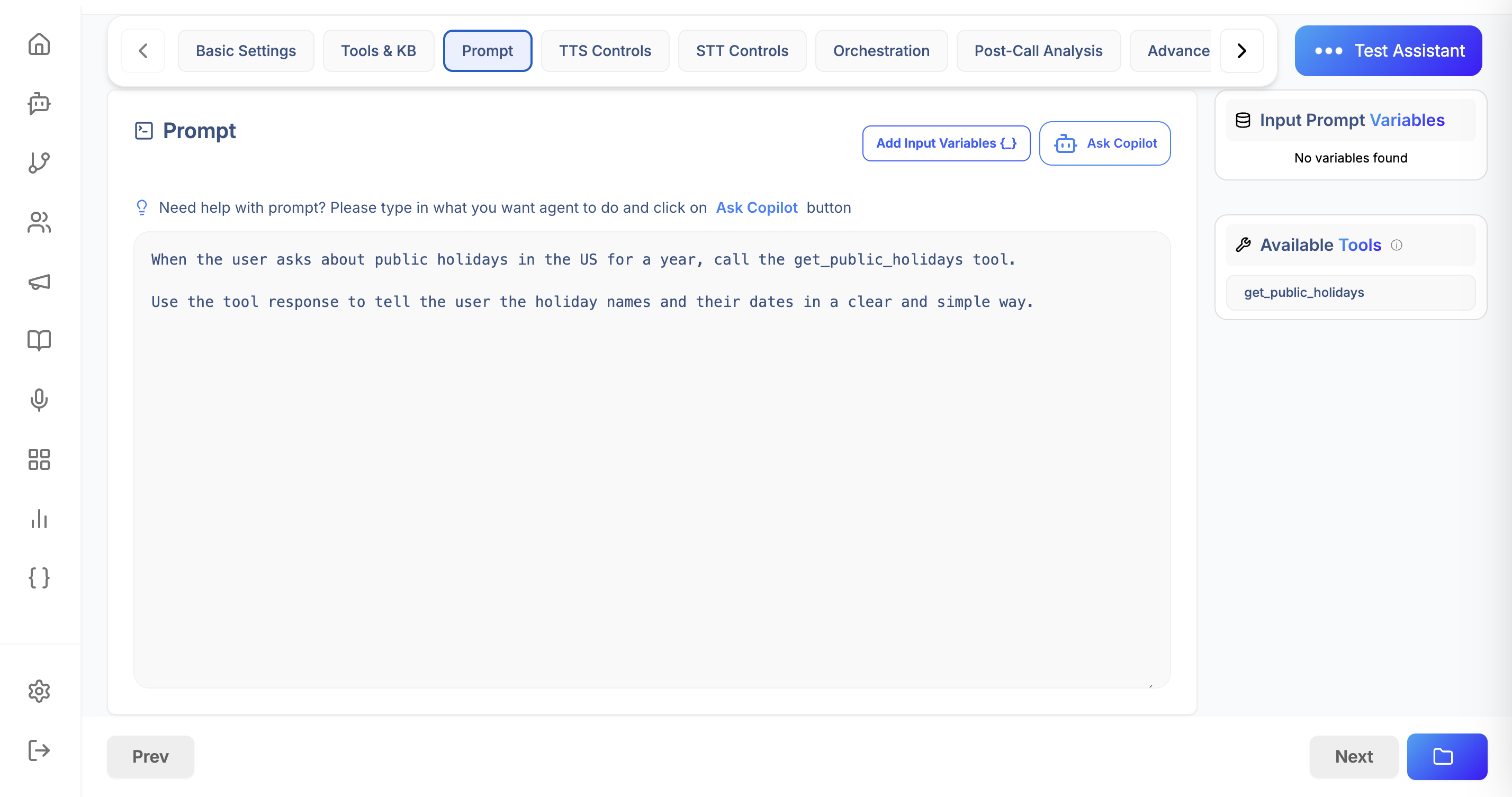
The Prompt tab defines the core conversational instructions for your assistant. This is only required when assistant_mode is set to "prompt".
Prompt Structure
Fields:
template(required): The main prompt template with instructionsvars(array): List of variable names that can be used in the templateoutput_variables(array, optional): Variables to extract from conversations
Example:
{
  "prompt": {
    "template": "You are a helpful customer support agent for Acme Corp. Your role is to:\n1. Greet customers warmly\n2. Understand their issue\n3. Provide solutions or escalate to human agents\n4. Be professional and empathetic\n\nCurrent time: {{timestamp}}\nCaller number: {{call_from}}\n\nCustomer says: {{user_input}}",
    "vars": ["timestamp", "call_from", "user_input"],
    "output_variables": ["customer_name", "issue_type", "resolution_status"]
  }
}
 Template Variables:
{{timestamp}}: Current timestamp (ifinclude_current_timestampis enabled){{call_from}}: Caller's phone number (ifinclude_call_fromis enabled){{user_input}}: What the user just said- Custom variables defined in
varsarray
Output Variables: Variables that should be extracted from the conversation and stored for post-call analysis.
3. TTS Controls
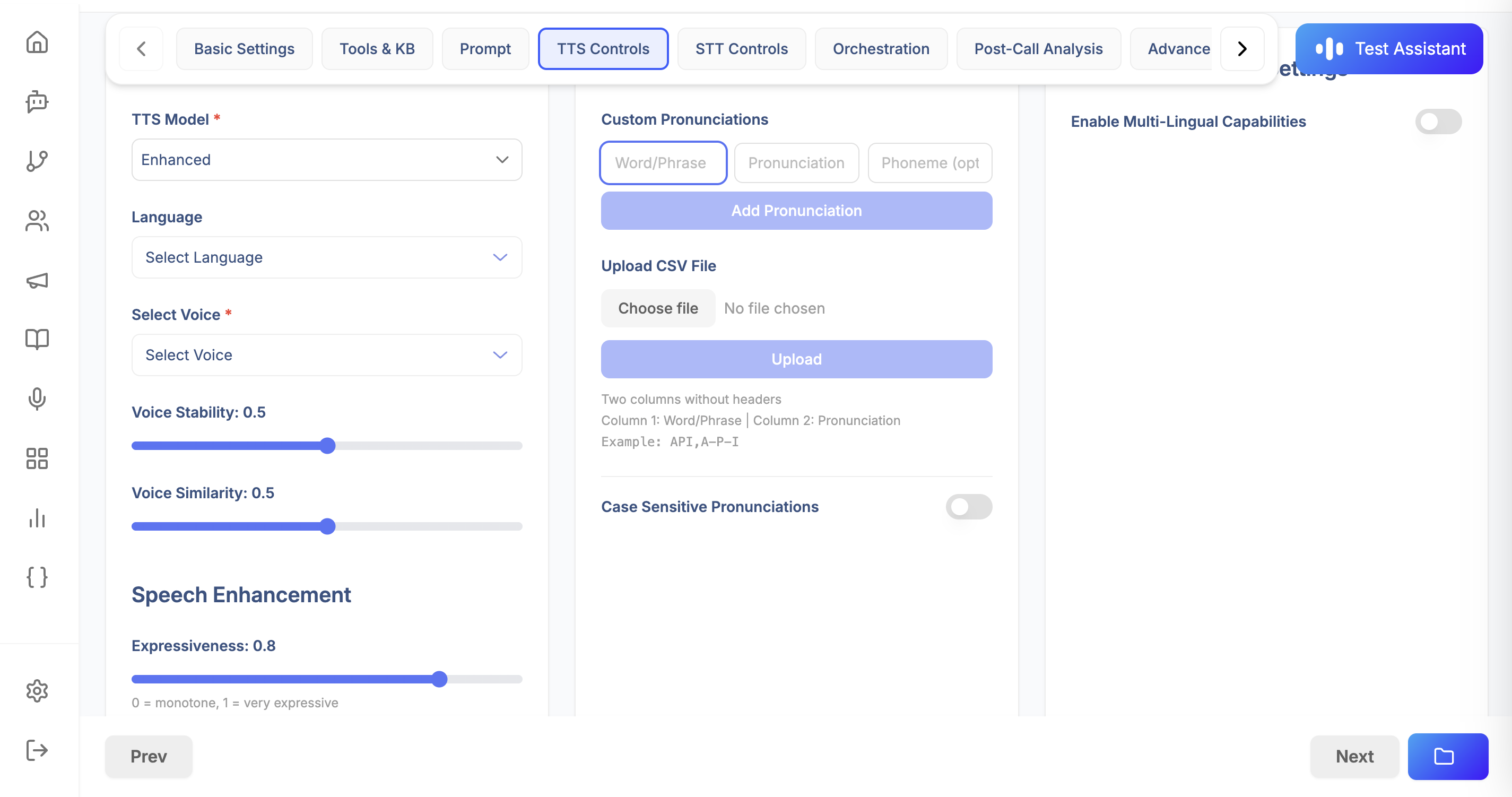
Text-to-Speech (TTS) settings control how the assistant's voice sounds and speaks.
3.1 Voice Configuration
Fields:
model(required): UUID of the TTS model to usevoice: Voice settingsvoice_id(required): Unique identifier for the voicespeaker_name(required): Human-readable name (e.g., "Michael", "Sarah")speaker_type(string): "voicing"language(required): Language code (e.g., "en", "es", "fr")stability(float, 0.0-1.0): Voice consistency (default: 0.5)similarity_boost(float, 0.0-1.0): Similarity to original voice (default: 0.5)
Example:
{
  "tts_settings": {
    "model": "019cc123-4def-5678-9abc-def012345678",
    "voice": {
      "voice_id": "1SM7GgM6IMuvQlz2BwM3",
      "speaker_name": "Michael",
      "speaker_type": "voicing",
      "language": "en",
      "stability": 0.5,
      "similarity_boost": 0.5
    }
  }
}
3.2 Pronunciation Guide
Custom pronunciation rules for specific words or phrases.
Fields:
pronunciation_guide(array): List of pronunciation rulesword(string): Word to customizepronunciation(string): How to pronounce itphoneme(string, optional): Phonetic representationphoneme_replacement(string, optional): Phoneme replacement
source_url(string, optional): URL to CSV file with pronunciation rulescase_sensitive(boolean): Whether matching is case-sensitive
Example:
{
  "pronunciation": {
    "pronunciation_guide": [
      {
        "word": "Voicing",
        "pronunciation": "VOY-sing",
        "phoneme": "V OY S IH NG"
      },
      {
        "word": "API",
        "pronunciation": "A-P-I",
        "phoneme": "EY P IY"
      }
    ],
    "source_url": "https://storage.example.com/pronunciation.csv",
    "case_sensitive": false
  }
}
3.3 Speech Enhancements
Fine-tune how speech is generated and delivered.
Fields:
expressiveness(integer, 0-100): Emotional expressiveness (default: 80)speed(float, 0.25-2.0): Speech speed multiplier (default: 1.0)enable_number_normalization(boolean): Convert numbers to words (default: true)enable_ssml(boolean): Enable SSML markup support (default: false)stream_audio(boolean): Stream audio in real-time (default: true)
Example:
{
  "speech_enhancements": {
    "expressiveness": 75,
    "speed": 1.0,
    "enable_number_normalization": true,
    "enable_ssml": false,
    "stream_audio": true
  }
}
3.4 Multi-Language Support
Configure multi-language capabilities for the assistant.
Fields:
enabled(boolean): Enable multi-language supportauto_detect_language(boolean): Automatically detect caller's languagetranslation_provider(string): Translation service providersupported_languages(array): List of supported languages (e.g., ["English", "Spanish", "French"])
Example:
{
  "multi_language": {
    "enabled": true,
    "auto_detect_language": true,
    "translation_provider": "default",
    "supported_languages": ["English", "Spanish", "French", "German"]
  }
}
Complete TTS Settings Example:
{
  "tts_settings": {
    "model": "019cc123-4def-5678-9abc-def012345678",
    "voice": {
      "voice_id": "1SM7GgM6IMuvQlz2BwM3",
      "speaker_name": "Michael",
      "speaker_type": "voicing",
      "language": "en",
      "stability": 0.5,
      "similarity_boost": 0.5
    },
    "pronunciation": {
      "pronunciation_guide": [],
      "case_sensitive": false
    },
    "speech_enhancements": {
      "expressiveness": 80,
      "speed": 1.0,
      "enable_number_normalization": true,
      "enable_ssml": false,
      "stream_audio": true
    },
    "multi_language": {
      "enabled": false,
      "auto_detect_language": false,
      "translation_provider": null,
      "supported_languages": null
    }
  }
}
4. STT Controls
Speech-to-Text (STT) settings control how the assistant understands what callers are saying.
4.1 Recognition Settings
Fields:
model(required): UUID or string identifier of the STT modelsupported_languages(array, required): List of language codes (e.g., ["en", "es"])enable_multi_language(boolean): Enable multi-language recognition
Example:
{
  "recognition": {
    "model": "019dd234-5efg-6789-abcd-ef0123456789",
    "supported_languages": ["en", "es"],
    "enable_multi_language": true
  }
}
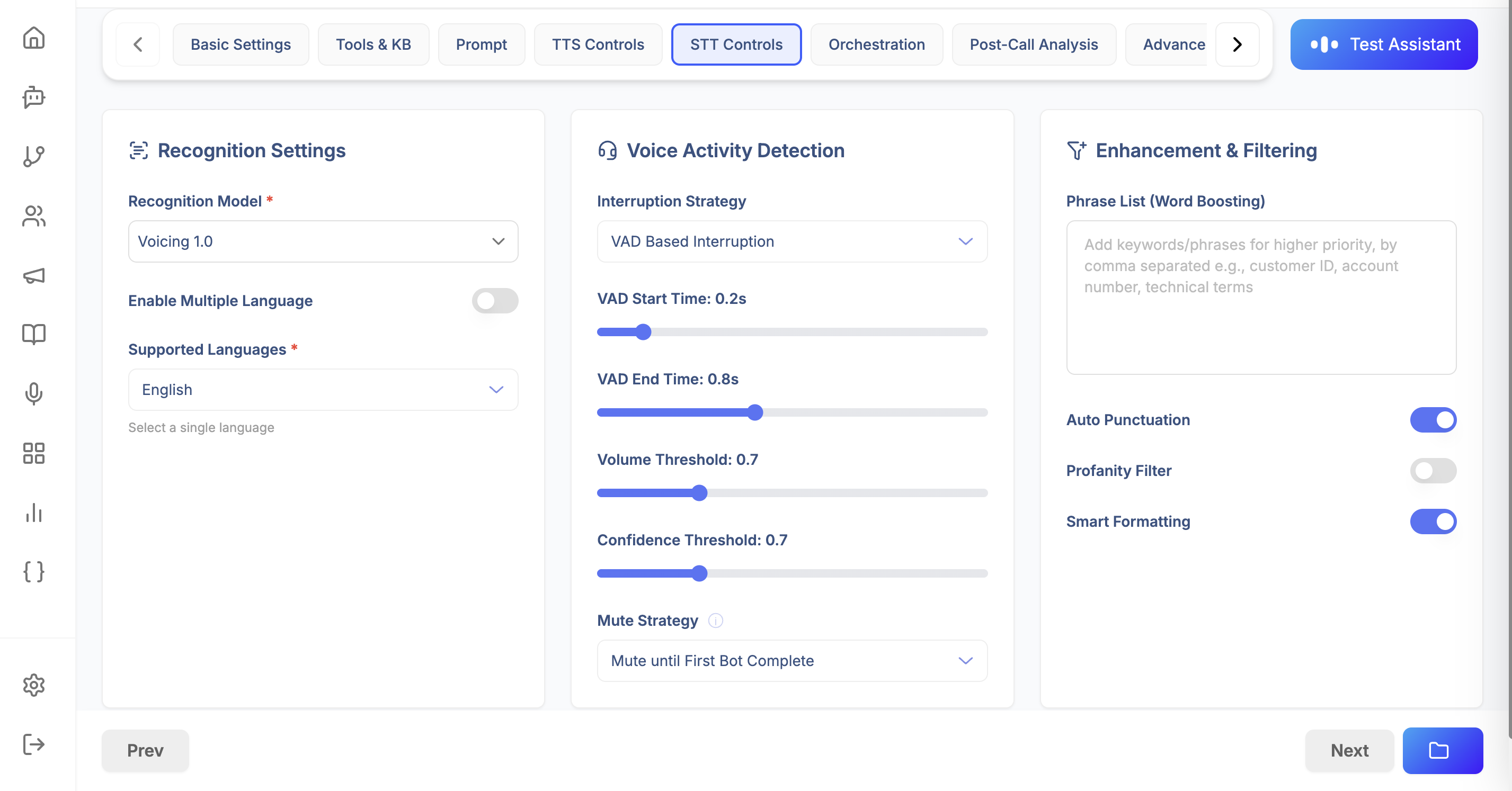
4.2 Voice Activity Detection (VAD)
Controls when the system detects that the user is speaking.
Fields:
start_time(float): Seconds before speech starts to begin detection (default: 0.2)end_time(float): Seconds after speech ends to stop detection (default: 0.8)volume_threshold(float, 0.0-1.0): Minimum volume to detect speech (default: 0.7)confidence_threshold(float, 0.0-1.0): Minimum confidence for speech detection (default: 0.7)endpoint_sensitivity(float, optional): Sensitivity for detecting speech endpointsinterruption_strategy(string): How to handle interruptions - "vad-based" or "word-level-interruption"mute_strategy(string or array): When to mute - ["mute_until_first_bot_complete"]word_count(integer): Number of words for word-level interruption (if applicable)
Example:
{
  "voice_activity_detection": {
    "start_time": 0.2,
    "end_time": 0.8,
    "volume_threshold": 0.7,
    "confidence_threshold": 0.7,
    "endpoint_sensitivity": 0.5,
    "interruption_strategy": "vad-based",
    "mute_strategy": ["mute_until_first_bot_complete"],
    "word_count": 2
  }
}
4.3 Enhancements and Filters
Audio processing and text filtering options.
Fields:
phrase_list(array): Custom phrases to improve recognition accuracyauto_punctuation(boolean): Automatically add punctuation (default: true)profanity_filter(boolean): Filter profanity from transcripts (default: false)smart_formatting(boolean): Apply smart formatting to numbers, dates, etc. (default: true)right_party_contact(boolean): Verify caller identity (default: false)diarization(boolean): Identify different speakers (default: false)
Example:
{
  "enhancements_and_filter": {
    "phrase_list": ["Voicing AI", "customer support", "technical issue"],
    "auto_punctuation": true,
    "profanity_filter": false,
    "smart_formatting": true,
    "right_party_contact": false,
    "diarization": false
  }
}
Complete STT Settings Example:
{
  "stt_settings": {
    "recognition": {
      "model": "019dd234-5efg-6789-abcd-ef0123456789",
      "supported_languages": ["en"],
      "enable_multi_language": false
    },
    "voice_activity_detection": {
      "start_time": 0.2,
      "end_time": 0.8,
      "volume_threshold": 0.7,
      "confidence_threshold": 0.7,
      "interruption_strategy": "vad-based",
      "mute_strategy": ["mute_until_first_bot_complete"],
      "word_count": 2
    },
    "enhancements_and_filter": {
      "phrase_list": [],
      "auto_punctuation": true,
      "profanity_filter": false,
      "smart_formatting": true,
      "right_party_contact": false,
      "diarization": false
    }
  }
}
5. Orchestration
Orchestration settings control the flow and behavior of conversations, including idle detection, call transfers, and call endings.
5.1 User Idle Detection
Detects when the user is silent and prompts them to continue.
Fields:
enabled(boolean): Enable idle detection (default: true)idle_timeout_seconds(integer): Seconds of silence before prompting (default: 30)max_retries(integer): Maximum prompts before ending call (default: 3)nudge_phrases(array): Phrases to use when user is idle (e.g., ["Are you still there?", "Hello?"])goodbye_phrase(string): Final phrase before ending call after max retries
Example:
{
  "user_idle_detection": {
    "enabled": true,
    "idle_timeout_seconds": 30,
    "max_retries": 3,
    "nudge_phrases": [
      "Are you still there?",
      "Hello? Can you hear me?",
      "I'm still here if you need help."
    ],
    "goodbye_phrase": "Thank you for calling. Goodbye!"
  }
}
5.2 Call Transfer
Configure how calls are transferred to human agents or external numbers.
Fields:
enable_transfer(boolean): Enable call transfer functionalitydestinations(array): List of transfer destinationslabel(string): Human-readable label (e.g., "Sales Team", "Support")value(string): Phone number or extensiontransfer_phrases(array, optional): Phrases that trigger this transfermatch_threshold(float, 0.0-1.0): Confidence threshold for phrase matching (default: 0.8)transfer_message(string, optional): Message to play before transferring
Example:
{
  "call_transfer": {
    "enable_transfer": true,
    "destinations": [
      {
        "label": "Sales Team",
        "value": "+1234567890",
        "transfer_phrases": ["speak to sales", "sales department", "buy something"],
        "match_threshold": 0.8,
        "transfer_message": "Transferring you to our sales team now."
      },
      {
        "label": "Technical Support",
        "value": "+1987654321",
        "transfer_phrases": ["technical support", "tech help", "IT department"],
        "match_threshold": 0.8,
        "transfer_message": "Connecting you with technical support."
      }
    ]
  }
}
5.3 Call End Settings
Control when and how calls end.
Fields:
end_phrases(array): Phrases that indicate the user wants to end the callmatch_threshold(float, 0.0-1.0): Confidence threshold for phrase matching (default: 0.8)max_call_duration_seconds(integer): Maximum call duration in seconds (0 = unlimited, default: 500)bot_can_end_call(boolean): Whether the bot can proactively end calls (default: true)voicemail_detection(boolean): Detect voicemail and handle accordingly (default: false)voicemail_message(string, optional): Message to leave on voicemail
Example:
{
  "call_end": {
    "end_phrases": [
      "goodbye",
      "thank you",
      "that's all",
      "have a nice day"
    ],
    "match_threshold": 0.8,
    "max_call_duration_seconds": 600,
    "bot_can_end_call": true,
    "voicemail_detection": true,
    "voicemail_message": "Hello, this is an automated message from Acme Corp. Please call back during business hours."
  }
}
5.4 Advanced Orchestration
Advanced settings for conversation orchestration.
Fields:
vad_ignore_strategy(string): How aggressively to ignore VAD events - "None", "Low", "Medium", "High" (default: "None")enable_transfer_pathways(boolean): Allow transferring to different pathways (default: false)fetch_previous_call_context(boolean): Load context from previous calls (default: false)user_profile_customization(boolean): Customize behavior based on user profile (default: false)context_for_prompts(boolean): Include additional context in prompts (default: false)
Example:
{
  "advanced_orchestration": {
    "vad_ignore_strategy": "None",
    "enable_transfer_pathways": false,
    "fetch_previous_call_context": true,
    "user_profile_customization": false,
    "context_for_prompts": true
  }
}
Complete Orchestration Settings Example:
{
  "orchestration_settings": {
    "user_idle_detection": {
      "enabled": true,
      "idle_timeout_seconds": 30,
      "max_retries": 3,
      "nudge_phrases": ["Are you still there?"],
      "goodbye_phrase": "Thank you for calling. Goodbye!"
    },
    "call_transfer": {
      "enable_transfer": true,
      "destinations": [
        {
          "label": "Support",
          "value": "+1234567890",
          "match_threshold": 0.8
        }
      ]
    },
    "call_end": {
      "end_phrases": ["goodbye", "thank you"],
      "match_threshold": 0.8,
      "max_call_duration_seconds": 600,
      "bot_can_end_call": true,
      "voicemail_detection": false
    },
    "advanced_orchestration": {
      "vad_ignore_strategy": "None",
      "enable_transfer_pathways": false,
      "fetch_previous_call_context": false,
      "user_profile_customization": false,
      "context_for_prompts": false
    }
  }
}
6. Tools & KB
Configure custom tools and knowledge bases that the assistant can use during conversations.
6.1 Tool Call Execution
Settings for how tools are executed.
Fields:
ack_messages(array): Acknowledgment messages to play while tools execute (e.g., ["Let me check that for you.", "One moment please."])max_retry_attempts(integer): Maximum retries if tool fails (default: 3)timeout_seconds(integer): Timeout for tool execution in seconds (default: 15)enable_tool_call_caching(boolean): Cache tool results for performance (default: false)
Example:
{
  "tool_call_execution": {
    "ack_messages": [
      "Let me check that for you.",
      "One moment while I look that up.",
      "Please hold while I retrieve that information."
    ],
    "max_retry_attempts": 3,
    "timeout_seconds": 15,
    "enable_tool_call_caching": false
  }
}
6.2 Tools
List of custom tools the assistant can use.
Fields (per tool):
tool_id(UUID, required): ID of the tool from the Tools sectionname(string, optional): Display name for the toolprompt(string, required): Instructions for when to use this tooltimeout_seconds(integer, optional): Tool-specific timeoutmax_retry_attempts(integer, optional): Tool-specific retry limit
Example:
{
  "tools": [
    {
      "tool_id": "019ee345-6fgh-7890-bcde-f01234567890",
      "name": "Check Order Status",
      "prompt": "Use this tool when the customer asks about their order status. Extract the order number from their message.",
      "timeout_seconds": 10,
      "max_retry_attempts": 2
    },
    {
      "tool_id": "019ff456-7ghi-8901-cdef-012345678901",
      "name": "Create Support Ticket",
      "prompt": "Use this tool when the customer reports an issue that needs to be tracked. Extract issue description and customer email.",
      "timeout_seconds": 20,
      "max_retry_attempts": 3
    }
  ]
}
6.3 Knowledge Bases
Knowledge bases that provide context for answering questions.
Fields (per knowledge base):
kb_id(UUID, required): ID of the knowledge basekb_name(string, optional): Display namekb_description(string, optional): Description of the knowledge base
Example:
{
  "knowledge_bases": [
    {
      "kb_id": "019aa111-2bcd-3456-def0-123456789012",
      "kb_name": "Product Documentation",
      "kb_description": "Complete product documentation and FAQs"
    },
    {
      "kb_id": "019bb222-3cde-4567-ef01-234567890123",
      "kb_name": "Company Policies",
      "kb_description": "Company policies and procedures"
    }
  ]
}
Complete Tools & KB Settings Example:
{
  "tools_and_kb_settings": {
    "tool_call_execution": {
      "ack_messages": ["Let me check that for you."],
      "max_retry_attempts": 3,
      "timeout_seconds": 15,
      "enable_tool_call_caching": false
    },
    "tools": [
      {
        "tool_id": "019ee345-6fgh-7890-bcde-f01234567890",
        "name": "Order Status Check",
        "prompt": "Use when customer asks about order status"
      }
    ],
    "knowledge_bases": [
      {
        "kb_id": "019aa111-2bcd-3456-def0-123456789012",
        "kb_name": "Product Docs",
        "kb_description": "Product documentation"
      }
    ]
  }
}
7. Post-Call Analysis
Configure what happens after a call ends, including analysis, webhooks, and data extraction.
7.1 Analysis Prompt
Custom prompt for analyzing call transcripts and extracting insights.
Fields:
prompt_text(string): Prompt template for post-call analysis
Example:
{
  "analysis_prompt": {
    "prompt_text": "Analyze this call transcript and extract:\n1. Call sentiment (positive/negative/neutral)\n2. Main topics discussed\n3. Customer satisfaction level\n4. Action items or follow-ups needed\n\nTranscript: {{transcript}}"
  }
}
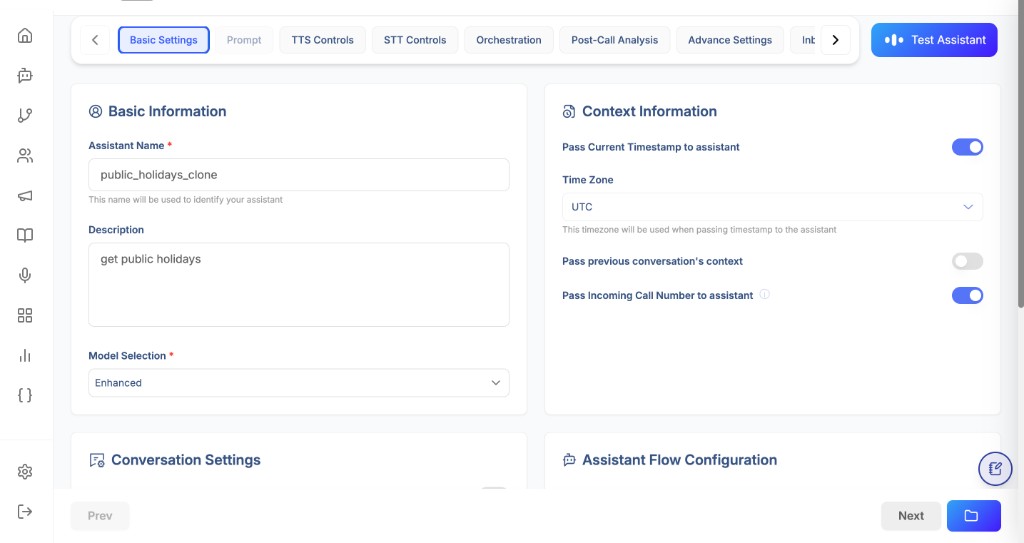
7.2 Post-Call Tools
Tools to execute after the call ends (e.g., update CRM, send notifications).
Post-call tools are essential when you want to convert a completed conversation into downstream business actions automatically. Instead of relying on a manual review workflow, the assistant can trigger selected tools right after call completion and pass analyzed context (summary, extracted fields, disposition, and other metadata) to external systems.
Common use cases include:
- sending confirmation or follow-up messages
- creating or updating CRM/ticket records
- logging call outcomes in internal systems
- triggering escalation workflows
- scheduling callbacks based on extracted intent
How post-call execution works
- The call ends (disconnect, completion, transfer end, or other terminal state).
- Post-call analysis prompt runs (if configured).
- Extract fields and disposition metadata are prepared.
- Selected post-call tools are invoked in configured order.
- Tool execution outputs are stored for observability and audit.
This design keeps real-time conversation handling lightweight while still enabling complete post-call automation after the interaction is complete.
Post-Call Tools panel behavior
In the Post-Call Tools panel, you can:
- select one or more tools from your configured tool catalog
- review currently selected tools
- define a disconnect trigger (for example,
Always) for each selected tool - remove tools that are not required for the workflow
Call Disconnect Trigger controls when a selected post-call tool should run at call termination. Using Always ensures the action executes consistently for every completed call.
Design guidance for reliable post-call automation
- Keep tools idempotent where possible (safe to run once without duplicate side effects).
- Keep payload contracts stable (field names and types should remain backward compatible).
- Validate required extracted fields before running strict downstream actions.
- Add fallback/alerting logic for failed tool execution (retry or queue-based recovery).
- Start with one high-value post-call action and expand gradually.
- Use clear tool names so operators can easily audit workflow intent.
Fields (per tool):
tool_id(UUID, required): ID of the tool to executename(string, optional): Display name
Example:
{
  "post_call_tools": [
    {
      "tool_id": "019gg567-8hij-9012-def0-123456789012",
      "name": "Update CRM"
    },
    {
      "tool_id": "019hh678-9ijk-0123-ef01-234567890123",
      "name": "Send Email Summary"
    }
  ]
}
7.3 Extract Fields
Fields to extract from the conversation for storage and analysis.
Example:
{
  "extract_fields": [
    "customer_name",
    "email_address",
    "phone_number",
    "company_name",
    "meeting_scheduled",
    "interest_level",
    "budget_range",
    "timeline"
  ]
}
7.4 Call Disposition Tracking
Track how calls ended for analytics.
Fields:
user_disconnected(boolean): Track if user hung uptransfer_completed(boolean): Track if call was transferredmax_duration_reached(boolean): Track if max duration was reachedbot_ended(boolean): Track if bot ended the calltechnical_issue(boolean): Track technical issuesvoicemail_detected(boolean): Track if voicemail was detected
Example:
{
  "call_disposition_tracking": {
    "user_disconnected": true,
    "transfer_completed": true,
    "max_duration_reached": true,
    "bot_ended": true,
    "technical_issue": true,
    "voicemail_detected": true
  }
}
Complete Post-Call Settings Example:
{
  "post_call_settings": {
    "analysis_prompt": {
      "prompt_text": "Analyze this call and extract key insights."
    },
    "post_call_tools": [
      {
        "tool_id": "019gg567-8hij-9012-def0-123456789012",
        "name": "Update CRM"
      }
    ],
    "extract_fields": [
      "customer_name",
      "email_address",
      "issue_type"
    ],
    "call_disposition_tracking": {
      "user_disconnected": true,
      "transfer_completed": true,
      "max_duration_reached": false,
      "bot_ended": true,
      "technical_issue": false,
      "voicemail_detected": false
    }
  }
}
8. Advance Settings
Advanced configuration for security, observability, and performance.
8.1 Security & Privacy
Fields:
pii_masking(boolean): Mask personally identifiable information (default: false)hipaa_compliance_mode(boolean): Enable HIPAA compliance features (default: true)end_to_end_encryption(boolean): Enable end-to-end encryption (default: true)store_transcripts(boolean): Store call transcripts (default: true)store_recordings(boolean): Store call recordings (default: true)data_retention_days(integer): Days to retain data (default: 90)
Example:
{
  "security_and_privacy": {
    "pii_masking": true,
    "hipaa_compliance_mode": true,
    "end_to_end_encryption": true,
    "store_transcripts": true,
    "store_recordings": true,
    "data_retention_days": 90
  }
}
8.2 Observability
Monitoring and alerting configuration.
Fields:
monitoring_stack(array): Monitoring tools to use (e.g., ["LangFuse", "Sentry", "DataDog"])enable_guardrails(boolean): Enable AI guardrailsguardrails_provider(string): Guardrails service provideralert_email(string): Email for alerts
Example:
{
  "observability": {
    "monitoring_stack": ["LangFuse", "Sentry"],
    "enable_guardrails": true,
    "guardrails_provider": "default",
    "alert_email": "alerts@example.com"
  }
}
8.3 Performance
Performance optimization settings.
Fields:
cache_strategy(string): Caching strategy - "none", "redis", "memory"concurrent_call_limit(integer): Maximum concurrent callsresponse_timeout_seconds(integer): Timeout for AI responsesenable_cdn(boolean): Enable CDN for faster deliveryserver_region(string): Preferred server region
Example:
{
  "performance": {
    "cache_strategy": "redis",
    "concurrent_call_limit": 100,
    "response_timeout_seconds": 30,
    "enable_cdn": true,
    "server_region": "us-east-1"
  }
}
Complete Advanced Settings Example:
{
  "advanced_settings": {
    "security_and_privacy": {
      "pii_masking": false,
      "hipaa_compliance_mode": true,
      "end_to_end_encryption": true,
      "store_transcripts": true,
      "store_recordings": true,
      "data_retention_days": 90
    },
    "observability": {
      "monitoring_stack": [],
      "enable_guardrails": false,
      "guardrails_provider": null,
      "alert_email": null
    },
    "performance": {
      "cache_strategy": null,
      "concurrent_call_limit": null,
      "response_timeout_seconds": null,
      "enable_cdn": false,
      "server_region": null
    }
  }
}
9. Inbound Calls
Telephony settings for handling inbound calls (configured via Deployments, but referenced here).
Telephony Provider Settings
Fields:
provider(string): Telephony provider identifier (e.g., "default")inbound_webhook_url(string): Webhook URL for inbound call eventsphone_number(string): Phone number assigned to this assistantenable_call_recording(boolean): Record callsenable_sip_transfer(boolean): Enable SIP-based transfers
Audio Settings
Fields:
codec(string): Audio codec (e.g., "OPUS", "PCMU", "PCMA")sample_rate(integer): Audio sample rate (e.g., 16000)echo_cancellation(boolean): Enable echo cancellation (default: true)noise_suppression(boolean): Enable noise suppression (default: true)
Example:
{
  "telephony_settings": {
    "telephony": {
      "provider": "default",
      "inbound_webhook_url": "https://api.example.com/webhooks/inbound",
      "phone_number": "+1234567890",
      "enable_call_recording": true,
      "enable_sip_transfer": false
    },
    "audio": {
      "codec": "OPUS",
      "sample_rate": 16000,
      "echo_cancellation": true,
      "noise_suppression": true
    }
  }
}
Note: Inbound call configuration is typically done through the Deployments section, which links assistants to phone numbers.
Genesys Cloud (Inbound)
When using Genesys Cloud for inbound calling:
- Generate a Genesys key from the Voicing AI platform while creating/updating the Assistant.
- The generated key must be categorized under Category = Assistant.
- This key is then used on Genesys Cloud to complete the inbound integration.
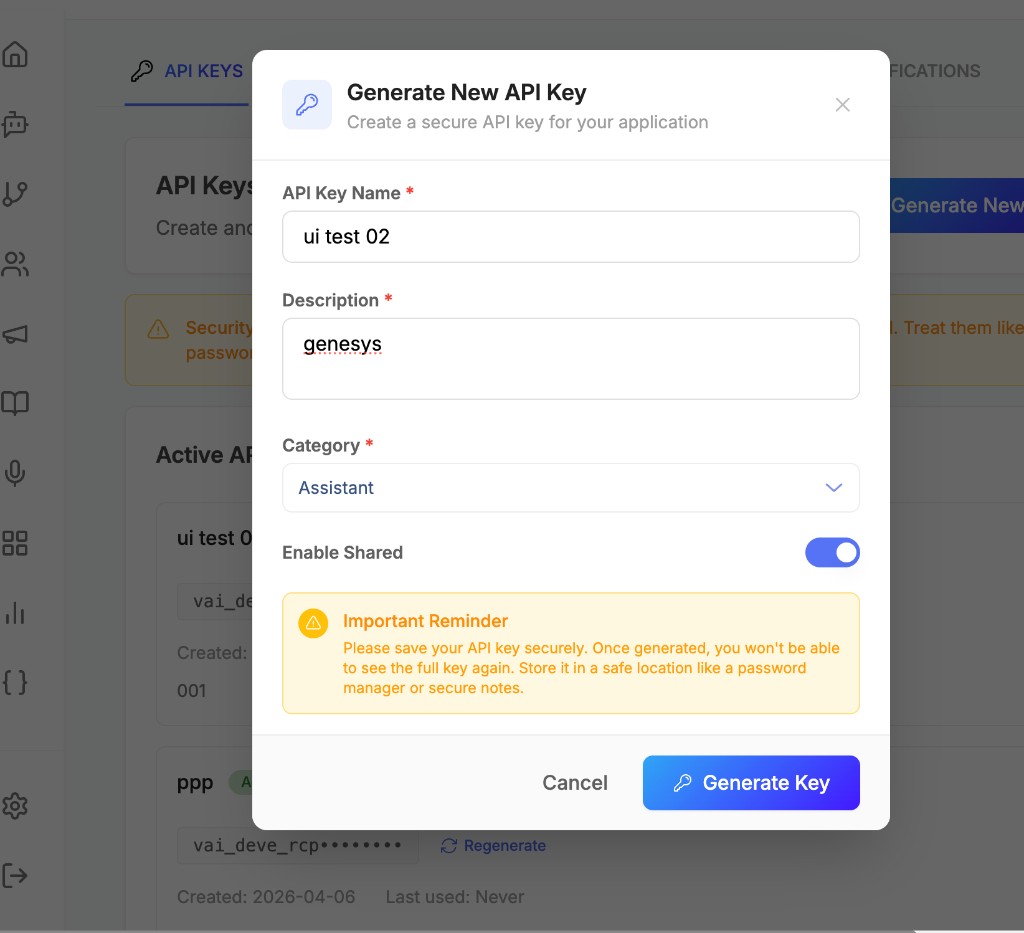

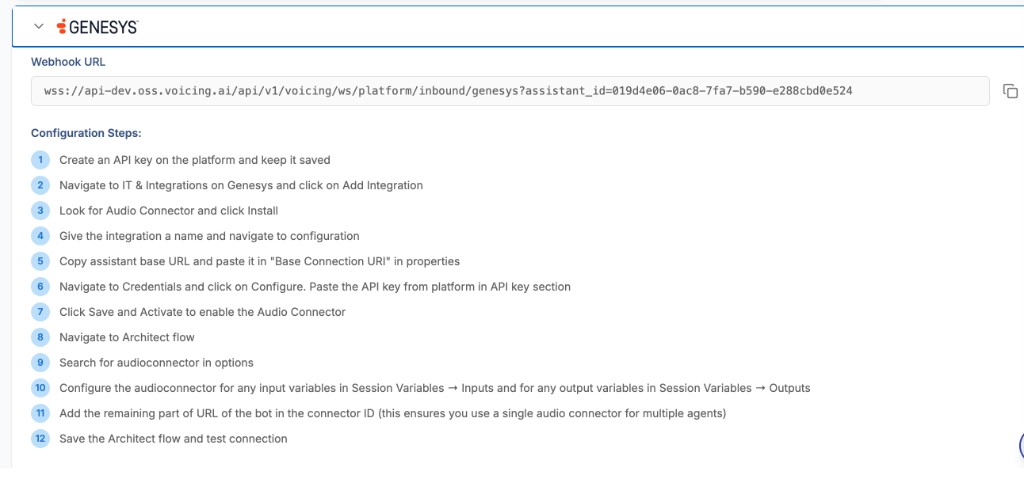
Example (Genesys Key):
{
  "name": "ui test 02",
  "description": "genesys",
  "category": "assistant",
  "is_shared": true,
  "environment": "development",
  "metadata": {}
}
10. Chatbot
The Chatbot mode in Assistant testing lets you validate how your assistant behaves in a text-chat interface using the same configured prompt, tools, and context settings. This is especially useful when your assistant is integrated with tools and you want to quickly verify tool-driven responses before moving to production channels.
In this mode, the assistant can respond to user questions by calling configured tools (for example, a holiday lookup tool), then returning a structured and user-friendly answer in chat.
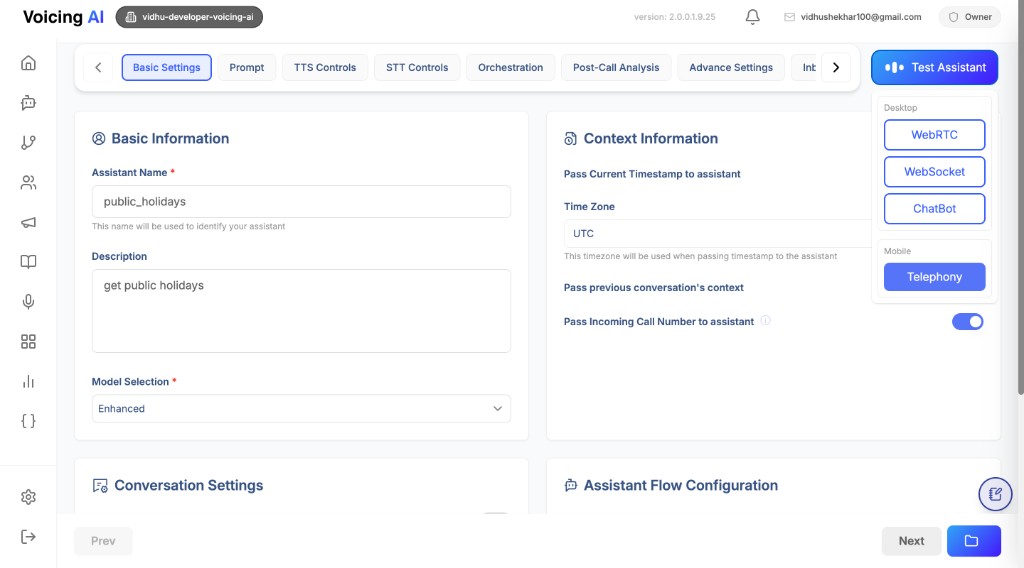
Why chatbot testing is important
- Faster iteration than live telephony testing.
- Clear visibility into prompt quality and tool behavior.
- Easy debugging for tool selection, output formatting, and response quality.
- Useful for validating business logic before voice deployment.
How chatbot works with integrated tools
- You configure the assistant prompt and attach tools in the assistant configuration.
- During a chat query, the assistant interprets intent and selects a relevant tool.
- Tool output is used to compose the final response shown in the chat panel.
- You can iteratively refine prompt/tool instructions and re-test instantly.
This helps confirm that:
- the correct tool is being invoked for the right query
- returned data is transformed into readable user responses
- fallback behavior is acceptable when data is missing
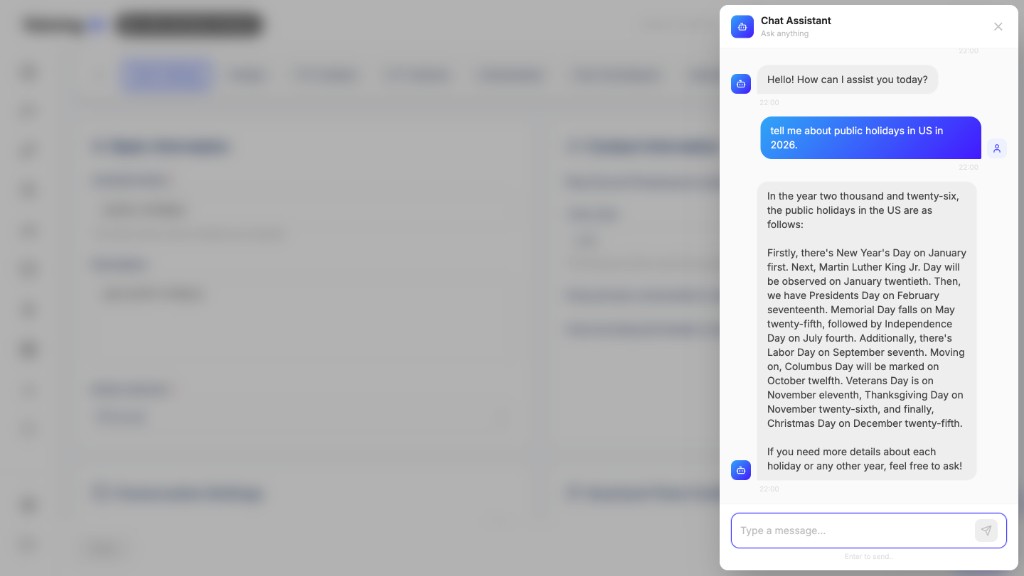
Configuration guidance for better chatbot outcomes
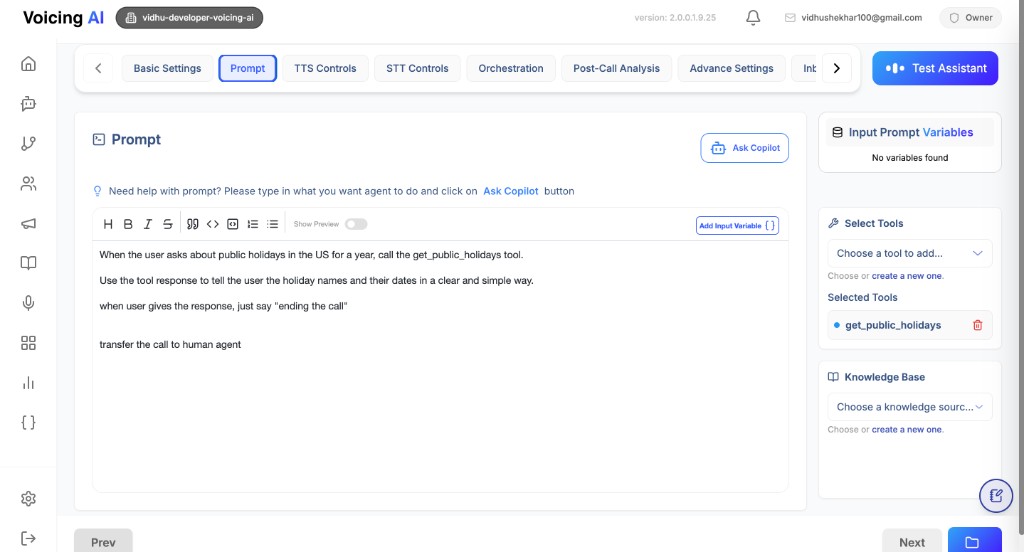
- Keep tool descriptions explicit so the assistant can choose the right tool.
- In prompt instructions, define when tool calls are mandatory vs optional.
- Specify output style (concise vs detailed) for consistent responses.
- Add safe fallback instructions when tool output is empty or uncertain.
- Test with multiple query styles (short, detailed, ambiguous, follow-up).
The Prompt tab and tool mapping panel are key for chatbot quality, because they control intent handling and tool usage behavior.
Complete Examples
Example 1: Prompt-Based Customer Support Assistant
{
  "status": "draft",
  "prompt": {
    "template": "You are a helpful customer support agent for Acme Corp.\n\nYour responsibilities:\n1. Greet customers warmly\n2. Listen to their concerns\n3. Provide solutions or escalate to human agents\n4. Be professional, empathetic, and concise\n\nCurrent time: {{timestamp}}\nCaller: {{call_from}}\n\nCustomer says: {{user_input}}",
    "vars": ["timestamp", "call_from", "user_input"],
    "output_variables": ["customer_name", "issue_type", "resolution_status"]
  },
  "basic_settings": {
    "basic_info": {
      "name": "customer_support_assistant",
      "description": "Handles customer support inquiries",
      "model_selection": "019bb7a2-bc4f-7f09-a79c-2d6445d2811f"
    },
    "conversation": {
      "enable_welcome_message": true,
      "custom_greeting": "Hello! Thank you for calling Acme Corp. How can I assist you today?",
      "conversation_style": "Professional"
    },
    "context_info": {
      "include_current_timestamp": true,
      "timezone": "America/New_York",
      "include_call_from": true,
      "include_location": false,
      "previous_context": {
        "include_previous_context": true,
        "previous_history_days": 7
      }
    },
    "assistant_flow_manager": {
      "assistant_mode": "prompt",
      "pathway_id": null
    }
  },
  "tts_settings": {
    "model": "019cc123-4def-5678-9abc-def012345678",
    "voice": {
      "voice_id": "1SM7GgM6IMuvQlz2BwM3",
      "speaker_name": "Michael",
      "speaker_type": "voicing",
      "language": "en",
      "stability": 0.5,
      "similarity_boost": 0.5
    },
    "speech_enhancements": {
      "expressiveness": 75,
      "speed": 1.0,
      "enable_number_normalization": true
    }
  },
  "stt_settings": {
    "recognition": {
      "model": "019dd234-5efg-6789-abcd-ef0123456789",
      "supported_languages": ["en"]
    },
    "voice_activity_detection": {
      "start_time": 0.2,
      "end_time": 0.8,
      "volume_threshold": 0.7,
      "confidence_threshold": 0.7
    }
  },
  "orchestration_settings": {
    "user_idle_detection": {
      "enabled": true,
      "idle_timeout_seconds": 30,
      "max_retries": 3
    },
    "call_transfer": {
      "enable_transfer": true,
      "destinations": [
        {
          "label": "Human Agent",
          "value": "+1234567890",
          "match_threshold": 0.8
        }
      ]
    },
    "call_end": {
      "max_call_duration_seconds": 600,
      "bot_can_end_call": true
    }
  },
  "tools_and_kb_settings": {
    "tools": [
      {
        "tool_id": "019ee345-6fgh-7890-bcde-f01234567890",
        "name": "Create Support Ticket",
        "prompt": "Use when customer reports an issue"
      }
    ],
    "knowledge_bases": [
      {
        "kb_id": "019aa111-2bcd-3456-def0-123456789012",
        "kb_name": "Support FAQs"
      }
    ]
  },
  "post_call_settings": {
    "analysis_prompt": {
      "prompt_text": "Analyze call and extract customer satisfaction and issue resolution."
    },
    "extract_fields": ["customer_name", "issue_type", "resolution_status"]
  }
}
Example 2: Pathways-Based Sales Assistant
{
  "status": "draft",
  "prompt": null,
  "basic_settings": {
    "basic_info": {
      "name": "sales_assistant",
      "description": "Handles sales inquiries and lead qualification",
      "model_selection": "019bb7a2-bc4f-7f09-a79c-2d6445d2811f"
    },
    "conversation": {
      "enable_welcome_message": true,
      "custom_greeting": "Hi! Thanks for your interest in our products. Let's get started!",
      "conversation_style": "Friendly"
    },
    "context_info": {
      "include_current_timestamp": true,
      "timezone": "UTC",
      "include_call_from": true
    },
    "assistant_flow_manager": {
      "assistant_mode": "pathways",
      "pathway_id": "019abb3c-6c9d-7fca-908c-5797cdba00be"
    }
  },
  "tts_settings": {
    "model": "019cc123-4def-5678-9abc-def012345678",
    "voice": {
      "voice_id": "2TN8HhN7JNuvRlz3CxN4",
      "speaker_name": "Sarah",
      "speaker_type": "voicing",
      "language": "en"
    }
  },
  "stt_settings": {
    "recognition": {
      "model": "019dd234-5efg-6789-abcd-ef0123456789",
      "supported_languages": ["en"]
    }
  },
  "orchestration_settings": {
    "user_idle_detection": {
      "enabled": true,
      "idle_timeout_seconds": 20
    },
    "call_transfer": {
      "enable_transfer": true,
      "destinations": [
        {
          "label": "Sales Team",
          "value": "+1987654321"
        }
      ]
    }
  },
  "tools_and_kb_settings": {
    "tools": [
      {
        "tool_id": "019ff456-7ghi-8901-cdef-012345678901",
        "name": "Update CRM",
        "prompt": "Use to update lead information in CRM"
      }
    ]
  }
}
Validation Rules
Required Fields for Active Assistant
When marking an assistant as active, the following fields are required:
-
Basic Settings:
basic_info.name(non-empty)basic_info.model_selection(valid UUID)assistant_flow_manager.assistant_mode("prompt" or "pathways")- If
assistant_modeis "prompt":prompt.templatemust be provided - If
assistant_modeis "pathways":assistant_flow_manager.pathway_idmust be provided
-
TTS Settings:
tts_settings.model(valid UUID)tts_settings.voice.voice_id(non-empty)tts_settings.voice.speaker_name(non-empty)tts_settings.voice.language(non-empty)
-
STT Settings:
stt_settings.recognition.model(valid UUID or string)stt_settings.recognition.supported_languages(non-empty array)
Field Constraints
- Voice Speed: Must be between 0.25 and 2.0
- Match Thresholds: Must be between 0.0 and 1.0
- Stability/Similarity Boost: Must be between 0.0 and 1.0
- Expressiveness: Must be between 0 and 100
- Idle Timeout: Must be positive integer
- Max Call Duration: Must be positive integer (0 = unlimited)
API Endpoints
Create Assistant
POST /api/v1/ai-assistant/
Content-Type: application/json
Authorization: Bearer <token>

{
  // Full assistant configuration as shown in examples above
}
Update Assistant
PUT /api/v1/ai-assistant/{assistant_id}
Content-Type: application/json
Authorization: Bearer <token>

{
  // Partial or full assistant configuration
}
Get Assistant
GET /api/v1/ai-assistant/{assistant_id}
Authorization: Bearer <token>
Mark Assistant as Active
PATCH /api/v1/ai-assistant/{assistant_id}/activate
Authorization: Bearer <token>
This endpoint performs comprehensive validation before activating the assistant.
Best Practices
-
Choose the Right Mode:
- Use Prompt Mode for simple, flexible conversations
- Use Pathways Mode for structured, multi-step flows with specific decision points
-
Voice Configuration:
- Test different voices to match your brand
- Adjust stability and similarity_boost for consistency
- Use pronunciation guides for brand names and technical terms
-
STT Optimization:
- Add phrase lists for domain-specific terms
- Adjust VAD thresholds based on call quality
- Enable smart formatting for better transcript quality
-
Tool Integration:
- Provide clear prompts for when tools should be used
- Set appropriate timeouts for external API calls
- Use acknowledgment messages to keep users informed
-
Context Management:
- Enable previous context for better continuity
- Use timezone settings for accurate timestamps
- Include caller information when relevant
-
Security:
- Enable PII masking for sensitive data
- Configure data retention policies
- Use HIPAA compliance mode for healthcare applications
File Uploads
Custom Greeting Audio
POST /api/v1/ai-assistant/upload/custom-greeting-audio
Content-Type: multipart/form-data
Authorization: Bearer <token>

file: <audio_file>
Returns: {"file_path": "uploads/greetings/..."}
Use in: basic_settings.conversation.custom_greeting_audio_file_path
TTS Pronunciation Source
POST /api/v1/ai-assistant/upload/tts-pronunciation-source
Content-Type: multipart/form-data
Authorization: Bearer <token>

file: <csv_file>
Returns: {"file_path": "uploads/pronunciation/..."}
Use in: tts_settings.pronunciation.source_url
Troubleshooting
Assistant Not Responding
- Check TTS and STT model IDs are valid
- Verify voice configuration is complete
- Ensure assistant is marked as
active
Poor Speech Recognition
- Add phrase lists for domain terms
- Adjust VAD thresholds
- Check audio codec and sample rate settings
Tools Not Executing
- Verify tool IDs are correct
- Check tool prompts are clear
- Review timeout and retry settings
Call Transfers Not Working
- Verify transfer destinations are configured
- Check match thresholds are appropriate
- Ensure transfer phrases are clear
Last updated: [04/08/2026]