Voices - Complete Documentation
Overview
Voices in Voicing AI platform are AI-generated speech profiles that convert text into natural-sounding speech. The platform supports multiple voice providers, voice types, and extensive customization options for creating lifelike conversational experiences.
Key Concepts
- Voice: A speech profile that defines how text is converted to audio
- Speaker: A specific voice instance with a name, language, and characteristics
- Voice Provider: The underlying TTS service (configured TTS provider)
- Voice Type: Curated (pre-built) or Cloned (custom-created)
- TTS Model: The AI model that powers voice generation
Table of Contents
- Voice Providers
- Voice Types
- Voice Configuration
- Voice API Endpoints
- Voice Service Methods
- TTS Models
- Voice Generation
- Voice Cloning
- Complete Code Examples
- Generate Voices
Voice Providers
Voicing AI uses a Text-to-Speech (TTS) provider to generate speech from text.
1. Voicing
Provider ID: "voicing"
Features:
- Custom TTS service
- Language mapping support
- Custom pronunciation rules
- Expressive level control
- Speed adjustment
- Translation capabilities
Configuration:
# Environment Variables Required
VOICING_TTS_API_KEY=your_api_key_here
VOICING_TTS_API_URL=https://api.voicing.ai
TTS_PROVIDER=voicing
Voice Settings:
speed(float): Speech speed multiplier (default: 1.0)expressive_level(0-100): Emotional expressiveness (default: 30)translate_text(boolean): Auto-translate text if neededoutput_format: Audio format (default: "pcm_24000")
Supported Languages:
- German (de)
- Greek (el)
- English (en)
- Spanish (es)
- Finnish (fi)
- French (fr)
- Italian (it)
- Portuguese (pt)
- Swedish (sv)
- Hindi (hi)
- English-UK (en-uk)
Example Voice Configuration:
{
  "voice_id": "speaker_001",
  "speaker_name": "Sarah",
  "speaker_type": "voicing",
  "language": "en",
  "stability": 0.5,
  "similarity_boost": 0.5
}
Voice Types
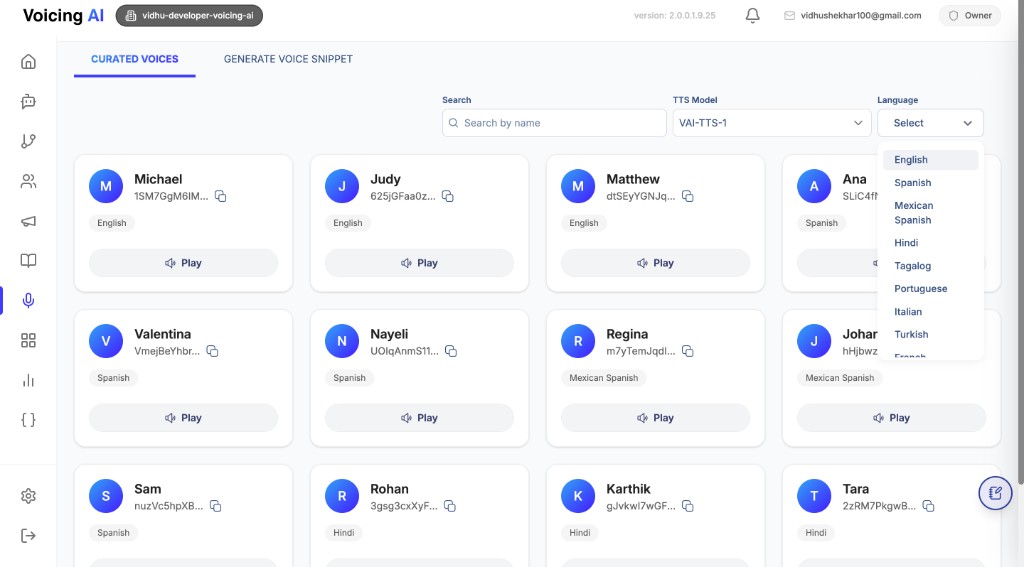
1. Curated Voices
Type: "curated"
Curated voices are pre-built, professionally designed voices available in the platform's voice library.
Characteristics:
- Pre-configured and ready to use
- Professionally optimized
- Available in multiple languages
- No training required
- Consistent quality
Usage: Curated voices are fetched from the external Voicing TTS API and displayed in the voice selection interface.
Example:
{
  "id": "019aa111-2bcd-3456-def0-123456789012",
  "name": "Michael",
  "language": "English",
  "accent": "American",
  "speaker_type": "voicing",
  "voice_id": "1SM7GgM6IMuvQlz2BwM3",
  "gender": "Male",
  "rating": "4.5",
  "tag": "professional-male-en"
}
2. Cloned Voices
Type: "cloned"
Cloned voices are custom voices created by training on audio samples provided by users.
Characteristics:
- Custom voice creation
- Requires audio samples
- Unique voice profiles
- Personal or brand-specific voices
- Training process required
Creation Process:
- Upload audio samples
- System processes and trains the model
- Voice clone is generated
- Voice becomes available for use
Example:
{
  "id": "019bb222-3cde-4567-ef01-234567890123",
  "name": "Custom Brand Voice",
  "voice_type": "cloned",
  "status": "completed",
  "voice_clone": {
    "voice_id": "custom_voice_123",
    "name": "Custom Brand Voice",
    "category": "cloned",
    "description": "Custom voice for brand identity"
  }
}
Voice Configuration
Assistant Voice Settings
Voices are configured in the Assistant's TTS Settings section.
Schema Structure:
{
  "tts_settings": {
    "model": "019cc123-4def-5678-9abc-def012345678",
    "voice": {
      "voice_id": "1SM7GgM6IMuvQlz2BwM3",
      "speaker_type": "voicing",
      "speaker_name": "Michael",
      "language": "en",
      "stability": 0.5,
      "similarity_boost": 0.5
    }
  }
}
Voice Fields Explained
voice_id (string, required)
- Unique identifier for the voice
- Provider voice ID / speaker identifier (from your configured TTS provider)
speaker_name (string, required)
- Human-readable name of the voice
- Examples: "Michael", "Sarah", "David"
- Used for display and identification
speaker_type (string, required)
- Provider type:
"voicing" - Determines which TTS service to use
- Auto-set based on
TTS_PROVIDERsetting if not specified
language (string, required)
- Language code or name
- Examples: "en", "English", "es", "Spanish"
- Must match voice's supported language
stability (float, 0.0-1.0, default: 0.5)
- Controls voice consistency when supported by your configured provider
similarity_boost (float, 0.0-1.0, default: 0.5)
- Controls similarity/voice adherence when supported by your configured provider
Complete Voice Configuration Example
{
  "tts_settings": {
    "model": "019cc123-4def-5678-9abc-def012345678",
    "voice": {
      "voice_id": "1SM7GgM6IMuvQlz2BwM3",
      "speaker_type": "voicing",
      "speaker_name": "Michael",
      "language": "en",
      "stability": 0.6,
      "similarity_boost": 0.7
    },
    "speech_enhancements": {
      "expressiveness": 75,
      "speed": 1.0,
      "enable_number_normalization": true
    }
  }
}
Voice API Endpoints
1. Get Curated Voices
Endpoint: GET /api/v1/aivoices
Description: Retrieve all available curated voices from the external TTS API.
Query Parameters:
language(optional, string): Filter voices by language (e.g., "English", "Spanish")model_id(optional, string): Filter voices by TTS model ID (filters by provider)
Authentication: Required (VOICES.VIEW permission)
Response Schema:
{
  "aivoices": [
    {
      "id": "019aa111-2bcd-3456-def0-123456789012",
      "name": "Michael",
      "language": "English",
      "accent": "American",
      "voice_id": "1SM7GgM6IMuvQlz2BwM3",
      "gender": "Male",
      "rating": "4.5",
      "tag": "professional-male-en",
      "filler_words": "um, uh, like",
      "profile_photo_url": "https://storage.example.com/voices/michael.jpg",
      "filler_words_audio_urls": "https://storage.example.com/voices/michael_filler.wav"
    }
  ]
}
Example Request:
curl -X GET "https://api.voicing.ai/api/v1/aivoices?language=English" \
  -H "Authorization: Bearer YOUR_TOKEN"
Example Response:
{
  "aivoices": [
    {
      "id": "voice_001",
      "name": "Michael",
      "language": "English",
      "accent": "American",
      "voice_id": "1SM7GgM6IMuvQlz2BwM3",
      "gender": "Male",
      "rating": "4.5",
      "tag": "professional-male-en"
    },
    {
      "id": "voice_002",
      "name": "Sarah",
      "language": "English",
      "accent": "British",
      "voice_id": "2TN8HhN7JNuvRlz3CxN4",
      "gender": "Female",
      "rating": "4.8",
      "tag": "professional-female-en-uk"
    }
  ]
}
2. Get Speaker Languages
Endpoint: GET /api/v1/aivoices/languages
Description: Retrieve all unique languages available from speaker profiles.
Query Parameters:
speaker(optional, string): Filter languages for a specific speaker namemodel_id(optional, string): Filter by TTS model ID
Authentication: Required (VOICES.VIEW permission)
Response Schema:
{
  "languages": [
    "English",
    "Spanish",
    "French",
    "German",
    "Hindi"
  ]
}
Example Request:
curl -X GET "https://api.voicing.ai/api/v1/aivoices/languages?speaker=Michael" \
  -H "Authorization: Bearer YOUR_TOKEN"
Example Response:
{
  "languages": [
    "English",
    "Spanish",
    "French"
  ]
}
Voice Service Methods
AIVoiceService
The AIVoiceService class handles all voice-related operations.
1. Get Speaker Profiles from External API
Method: get_speaker_profiles_from_external_api()
Description: Fetches speaker profiles from the external Voicing TTS API with optional filtering.
Parameters:
language(Optional[str]): Filter by languagemodel_id(Optional[str]): Filter by TTS model ID (determines provider)
Returns: List[IAIVoiceResponseSchema]
Code Example:
from app.services.aivoice_service import AIVoiceService
from app.dependencies.storage_service import get_storage_service
from sqlalchemy.ext.asyncio import AsyncSession

# Initialize service
aivoice_service = AIVoiceService(
    db=db_session,
    storage_service=storage_service
)

# Get all voices
all_voices = await aivoice_service.get_speaker_profiles_from_external_api()

# Get voices filtered by language
english_voices = await aivoice_service.get_speaker_profiles_from_external_api(
    language="English"
)

# Get voices filtered by model (provider)
model_voices = await aivoice_service.get_speaker_profiles_from_external_api(
    model_id="019cc123-4def-5678-9abc-def012345678"
)
2. Get All Speaker Languages
Method: get_all_speaker_languages()
Description: Extract all unique languages from available speaker profiles.
Parameters:
speaker(Optional[str]): Filter languages for a specific speakermodel_id(Optional[str]): Filter by TTS model ID
Returns: List[str] (sorted list of unique languages)
Code Example:
# Get all available languages
all_languages = await aivoice_service.get_all_speaker_languages()

# Get languages for a specific speaker
michael_languages = await aivoice_service.get_all_speaker_languages(
    speaker="Michael"
)

# Get languages for a specific model
model_languages = await aivoice_service.get_all_speaker_languages(
    model_id="019cc123-4def-5678-9abc-def012345678"
)
TTS Models
TTS Models define the AI engines that power voice generation. Each model supports specific voices and has unique capabilities.
TTS Model Structure
Database Schema:
class TTSModel(Base):
    id: UUID                          # Unique identifier
    model_name: str                   # Technical model name
    display_name: str                 # Human-readable name
    provider: str                     # "voicing"
    description: Optional[str]         # Model description
    supported_speakers: List[Dict]    # Available speakers/voices
    tags: List[str]                   # Categorization tags
    is_active: bool                   # Whether model is active
    recommended: bool                  # Whether model is recommended
    created_at: datetime
    updated_at: datetime
Supported Speakers Format
Each TTS model contains a supported_speakers array with voice information:
{
  "supported_speakers": [
    {
      "voice_id": "1SM7GgM6IMuvQlz2BwM3",
      "name": "Michael",
      "language": "en",
      "gender": "Male",
      "accent": "American"
    },
    {
      "voice_id": "2TN8HhN7JNuvRlz3CxN4",
      "name": "Sarah",
      "language": "en",
      "gender": "Female",
      "accent": "British"
    }
  ]
}
TTS Model API Endpoints
Create TTS Model
Endpoint: POST /api/v1/tts/models
Request Body:
{
  "model_name": "voicing_default",
  "display_name": "Voicing Default",
  "provider": "voicing",
  "description": "Default voice model",
  "supported_speakers": [
    {
      "voice_id": "1SM7GgM6IMuvQlz2BwM3",
      "name": "Michael",
      "language": "en"
    }
  ],
  "tags": ["multilingual", "high-quality"],
  "is_active": true,
  "recommended": true
}
Get TTS Models
Endpoint: GET /api/v1/tts/models
Query Parameters:
provider(optional): Filter by provider ("voicing")is_active(optional, boolean): Filter by active statusrecommended(optional, boolean): Filter by recommended status
Response:
{
  "success": true,
  "data": [
    {
      "id": "019cc123-4def-5678-9abc-def012345678",
      "display_name": "Voicing Default",
      "description": "Default voice model",
      "supported_speakers": [...],
      "tags": ["multilingual"],
      "is_active": true,
      "recommended": true,
      "created_at": "2025-01-08T10:00:00Z",
      "updated_at": "2025-01-08T10:00:00Z"
    }
  ],
  "total": 1
}
Voice Generation
Text-to-Speech Generation
The platform generates speech from text using configured voices and TTS providers.
TTS Generation Process
- Text Input: User provides text to convert
- Voice Selection: System uses configured voice settings
- Provider Selection: Based on
TTS_PROVIDERsetting or voicespeaker_type - Audio Generation: TTS API generates audio
- Format Conversion: Audio converted to WAV format
- Storage: Audio stored in cloud storage
- Record Creation: TTS record created in database
TTS Generation API
Endpoint: POST /api/v1/tts/generate
Request Body:
{
  "text": "Hello, this is a test message for text-to-speech conversion.",
  "voice": "1SM7GgM6IMuvQlz2BwM3",
  "language": "English"
}
Response:
{
  "success": true,
  "message": "Audio generated and stored successfully",
  "data": {
    "id": "123e4567-e89b-12d3-a456-426614174000",
    "text": "Hello, this is a test message for text-to-speech conversion.",
    "voice": "1SM7GgM6IMuvQlz2BwM3",
    "language": "en",
    "audio_url": "https://storage.googleapis.com/bucket/tts/user123/audio.wav",
    "provider": "voicing",
    "file_size": 48000,
    "created_at": "2025-01-08T14:30:00Z"
  }
}
TTS Service Code Example
from app.services.tts_service import TTSService
from app.dependencies.storage_service import get_storage_service
from sqlalchemy.ext.asyncio import AsyncSession

# Initialize service
tts_service = TTSService(
    storage_service=storage_service,
    db=db_session
)

# Generate and store audio
tts_record = await tts_service.generate_and_store_audio(
    user_id="user_123",
    text="Hello, welcome to our service!",
    voice="1SM7GgM6IMuvQlz2BwM3",
    language="en",
    organization_id="org_456"
)

# Access generated audio
audio_url = tts_record.audio_url
print(f"Audio available at: {audio_url}")
Voicing TTS Generation
Class: VoicingTTS
Methods:
text_to_audio()
Generate audio using Voicing TTS API.
Parameters:
text(str): Text to convertvoice(str): Voice ID or speaker namelanguage(str, default: "en"): Language code or nameoutput_format(str, default: "pcm_24000"): Audio formatspeed(float, default: 1.0): Speech speedexpressive_level(int, default: 30): Expressiveness (0-100)translate_text(bool, default: True): Auto-translate if needed
Returns: bytes (Base64-encoded audio string)
Code Example:
from app.utils.voice_generation_utils import VoicingTTS

# Initialize client
voicing_tts = VoicingTTS(
    api_key="your_api_key",
    api_url="https://api.voicing.ai"
)

# Generate audio
audio_base64 = await voicing_tts.text_to_audio(
    text="Hello, this is a test message.",
    voice="speaker_001",
    language="English",
    speed=1.0,
    expressive_level=50,
    translate_text=False
)

# Decode base64 to bytes
import base64
audio_bytes = base64.b64decode(audio_base64)
Voice Cloning
Voice cloning allows you to create custom voices by training on audio samples.
Complete Code Examples
Example 1: Get Available Voices
from fastapi import Depends
from app.services.aivoice_service import AIVoiceService
from app.dependencies.services import get_aivoice_service
from app.models.auth import AuthenticatedUserModel
from app.dependencies.current_user import require_permission
from app.constants.user import PERMISSIONS

async def get_voices_example(
    language: str = None,
    model_id: str = None,
    aivoice_service: AIVoiceService = Depends(get_aivoice_service),
    user: AuthenticatedUserModel = Depends(require_permission(PERMISSIONS.VOICES.VIEW))
):
    """Get available voices with optional filtering"""

    # Get all voices
    all_voices = await aivoice_service.get_speaker_profiles_from_external_api()

    # Get voices filtered by language
    if language:
        filtered_voices = await aivoice_service.get_speaker_profiles_from_external_api(
            language=language
        )
        return {"voices": filtered_voices}

    # Get voices filtered by model (provider)
    if model_id:
        model_voices = await aivoice_service.get_speaker_profiles_from_external_api(
            model_id=model_id
        )
        return {"voices": model_voices}

    return {"voices": all_voices}
Example 2: Configure Voice in Assistant
from app.schemas.assistant import AssistantCreateRequest, TTSSettings, AssistantVoice

# Create assistant with voice configuration
assistant_data = AssistantCreateRequest(
    basic_settings={
        "basic_info": {
            "name": "Customer Support Assistant",
            "description": "Handles customer inquiries",
            "model_selection": "019bb7a2-bc4f-7f09-a79c-2d6445d2811f"
        },
        "assistant_flow_manager": {
            "assistant_mode": "prompt",
            "pathway_id": None
        }
    },
    tts_settings=TTSSettings(
        model="019cc123-4def-5678-9abc-def012345678",
        voice=AssistantVoice(
            voice_id="1SM7GgM6IMuvQlz2BwM3",
            speaker_type="voicing",
            speaker_name="Michael",
            language="en",
            stability=0.6,
            similarity_boost=0.7
        ),
        speech_enhancements={
            "expressiveness": 75,
            "speed": 1.0,
            "enable_number_normalization": True
        }
    )
)

# Create assistant via API
response = await create_assistant(assistant_data)
Example 3: Generate TTS Audio
from app.services.tts_service import TTSService
from app.dependencies.storage_service import get_storage_service
from sqlalchemy.ext.asyncio import AsyncSession

async def generate_tts_example(
    db: AsyncSession,
    storage_service: BaseStorageService,
    user_id: str,
    text: str,
    voice_id: str,
    language: str = "en"
):
    """Generate TTS audio and store it"""

    # Initialize TTS service
    tts_service = TTSService(
        storage_service=storage_service,
        db=db
    )

    # Generate and store audio
    tts_record = await tts_service.generate_and_store_audio(
        user_id=user_id,
        text=text,
        voice=voice_id,
        language=language
    )

    return {
        "success": True,
        "audio_url": tts_record.audio_url,
        "record_id": str(tts_record.id),
        "file_size": tts_record.file_size
    }
Example 4: Clone Voice
Voice cloning examples are intentionally omitted here.
Example 5: Get TTS Records
from app.services.tts_service import TTSService
from uuid import UUID

async def get_tts_records_example(
    tts_service: TTSService,
    user_id: str,
    organization_id: UUID = None,
    limit: int = 50
):
    """Get TTS records for a user"""

    # Get user's TTS records
    records = await tts_service.get_user_tts_records(
        user_id=user_id,
        limit=limit,
        organization_id=organization_id
    )

    # Format response
    return {
        "records": [
            {
                "id": str(record.id),
                "text": record.text,
                "voice": record.voice,
                "language": record.language,
                "audio_url": record.audio_url,
                "provider": record.provider,
                "file_size": record.file_size,
                "created_at": record.created_at.isoformat()
            }
            for record in records
        ],
        "total": len(records)
    }
Example 6: Voice Configuration with Multiple Languages
from app.schemas.assistant import TTSSettings, MultiLanguageSettings

# Configure voice with multi-language support
tts_settings = TTSSettings(
    model="019cc123-4def-5678-9abc-def012345678",
    voice=AssistantVoice(
        voice_id="1SM7GgM6IMuvQlz2BwM3",
        speaker_type="voicing",
        speaker_name="Michael",
        language="en",
        stability=0.5,
        similarity_boost=0.5
    ),
    multi_language=MultiLanguageSettings(
        enabled=True,
        auto_detect_language=True,
        translation_provider="default",
        supported_languages=["English", "Spanish", "French", "German"]
    )
)
Voice Response Schemas
IAIVoiceResponseSchema
Response schema for voice profiles from external API.
class IAIVoiceResponseSchema(BaseModel):
    id: str
    name: str
    language: str
    accent: str
    voice_id: Optional[str] = None
    filler_words: str
    gender: Optional[str] = None
    rating: Optional[str] = None
    tag: Optional[str] = None
    profile_photo_url: Optional[str] = None
    filler_words_audio_file: Optional[str] = None
    filler_words_audio_urls: Optional[str] = None
    config_file: Optional[str] = None
    weight_file: Optional[str] = None
    speaker_metadat: Optional[Dict] = {}
    reference_audio_file: Optional[str] = None
AssistantVoiceResponse
Response schema for voice in assistant settings (without speaker_type).
class AssistantVoiceResponse(BaseModel):
    voice_id: str | None = None
    speaker_name: str | None = None
    language: Optional[str] = None
    stability: Optional[float] = 0.5
    similarity_boost: Optional[float] = 0.5
Voice Constants
Voice Type Enum
class VoiceType(str, BaseEnum):
    CURATED = "curated"    # Pre-built voices
    CLONED = "cloned"      # Custom cloned voices
Voice Status Enum
class Status(str, BaseEnum):
    DRAFT = "draft"        # Voice creation in progress
    COMPLETED = "completed"  # Voice ready for use
Best Practices
1. Voice Selection
-
Choose Appropriate Voice: Match voice characteristics to use case
- Professional voices for business applications
- Friendly voices for customer service
- Neutral voices for general purposes
-
Language Matching: Ensure voice language matches conversation language
-
Provider Selection: Consider provider capabilities for your needs
- Voicing: Best for custom requirements and specific languages
2. Voice Settings Tuning
-
Stability:
- Use lower values (0.3-0.5) for more natural, expressive speech
- Use higher values (0.7-1.0) for consistent, predictable speech
-
Similarity Boost:
- Use higher values (0.7-1.0) when voice consistency is critical
- Use lower values (0.3-0.5) for more variation
-
Speed:
- Default (1.0) is usually optimal
- Adjust slightly (0.9-1.1) for specific use cases
3. Voice Cloning
- Audio Quality: Use high-quality audio samples (16kHz+, clear audio)
- Sample Length: Provide 30-60 seconds of clear speech
- Sample Variety: Include different phrases and emotions
- Background Noise: Minimize background noise in samples
4. Performance Optimization
- Caching: Enable TTS caching for frequently used phrases
- Batch Generation: Generate multiple audio files in batch when possible
- Storage Management: Regularly clean up unused TTS records
5. Multi-Language Support
- Auto-Detection: Enable auto language detection for international users
- Language Mapping: Ensure proper language code mapping
- Translation: Use translation provider for seamless multilingual experience
Troubleshooting
Voice Not Generating
Issue: TTS generation fails or returns empty audio
Solutions:
- Check API keys are configured correctly
- Verify voice_id is valid for the provider
- Ensure text is not empty and within length limits
- Check provider API status
- Verify network connectivity
Wrong Voice Playing
Issue: Different voice than expected is used
Solutions:
- Verify
voice_idmatches the intended voice - Check
speaker_typematches the provider - Ensure voice is available for the selected language
- Verify TTS model supports the voice
Poor Audio Quality
Issue: Generated audio sounds distorted or unclear
Solutions:
- Adjust stability and similarity_boost settings
- Check audio format and sample rate
- Verify provider model selection
- Test with different voice settings
Voice Cloning Fails
Issue: Voice cloning process fails or produces poor results
Solutions:
- Ensure audio samples are high quality (16kHz+)
- Provide sufficient audio length (30-60 seconds)
- Minimize background noise
- Use clear, natural speech samples
- Check your provider's API quota and limits
Language Not Supported
Issue: Voice doesn't support requested language
Solutions:
- Check voice's supported languages
- Use a different voice that supports the language
- Enable translation if available
- Verify language code format (e.g., "en" vs "English")
API Reference Summary
Voice Endpoints
| Endpoint | Method | Description | Auth Required |
|---|---|---|---|
/api/v1/aivoices | GET | Get curated voices | Yes (VOICES.VIEW) |
/api/v1/aivoices/languages | GET | Get available languages | Yes (VOICES.VIEW) |
/api/v1/tts/generate | POST | Generate TTS audio | Yes |
/api/v1/tts/records | GET | Get TTS records | Yes |
/api/v1/tts/models | GET | Get TTS models | Yes |
/api/v1/tts/models | POST | Create TTS model | Yes (Admin) |
Voice Configuration in Assistant
{
  "tts_settings": {
    "model": "<TTS_MODEL_UUID>",
    "voice": {
      "voice_id": "<VOICE_ID>",
      "speaker_type": "voicing",
      "speaker_name": "<SPEAKER_NAME>",
      "language": "<LANGUAGE_CODE>",
      "stability": 0.0-1.0,
      "similarity_boost": 0.0-1.0
    },
    "speech_enhancements": {
      "expressiveness": 0-100,
      "speed": 0.25-2.0,
      "enable_number_normalization": true
    }
  }
}
Environment Variables
Required for Voicing TTS
VOICING_TTS_API_KEY=your_voicing_api_key
VOICING_TTS_API_URL=https://api.voicing.ai
TTS_PROVIDER=voicing
Storage Configuration
BUCKET_NAME=your_storage_bucket_name
CLOUD_PROVIDER=<your_cloud_provider>
Generate Voices
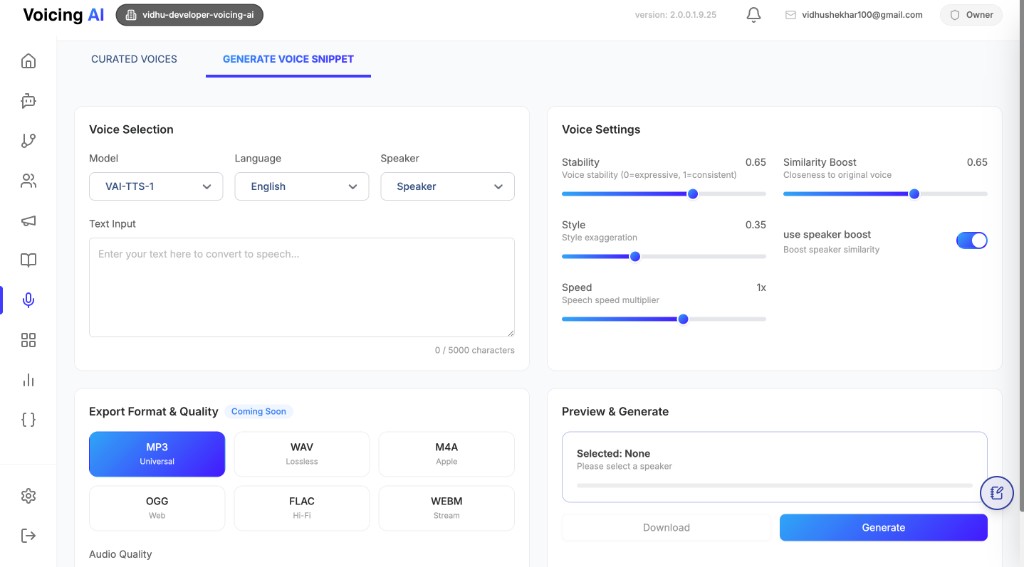
The Generate Voice Snippet tab is used to quickly synthesize speech from text before assigning a voice configuration to live assistants or pathways. It is ideal for validating voice quality, language fit, and synthesis parameters in a controlled preview flow.
- Select a TTS model, language, and speaker combination from supported options.
- Enter sample text and test how the output sounds before production usage.
- Tune key voice controls such as stability, similarity boost, style, and speed.
- Generate preview output and review the result before downloading.
Voice controls explained
- Stability: increases consistency across generated speech segments.
- Similarity Boost: keeps output closer to the selected base voice identity.
- Style: controls exaggeration and expressiveness in delivery.
- Use speaker boost: adds stronger speaker-preservation behavior.
- Speed: adjusts speech rate multiplier (for faster/slower delivery).
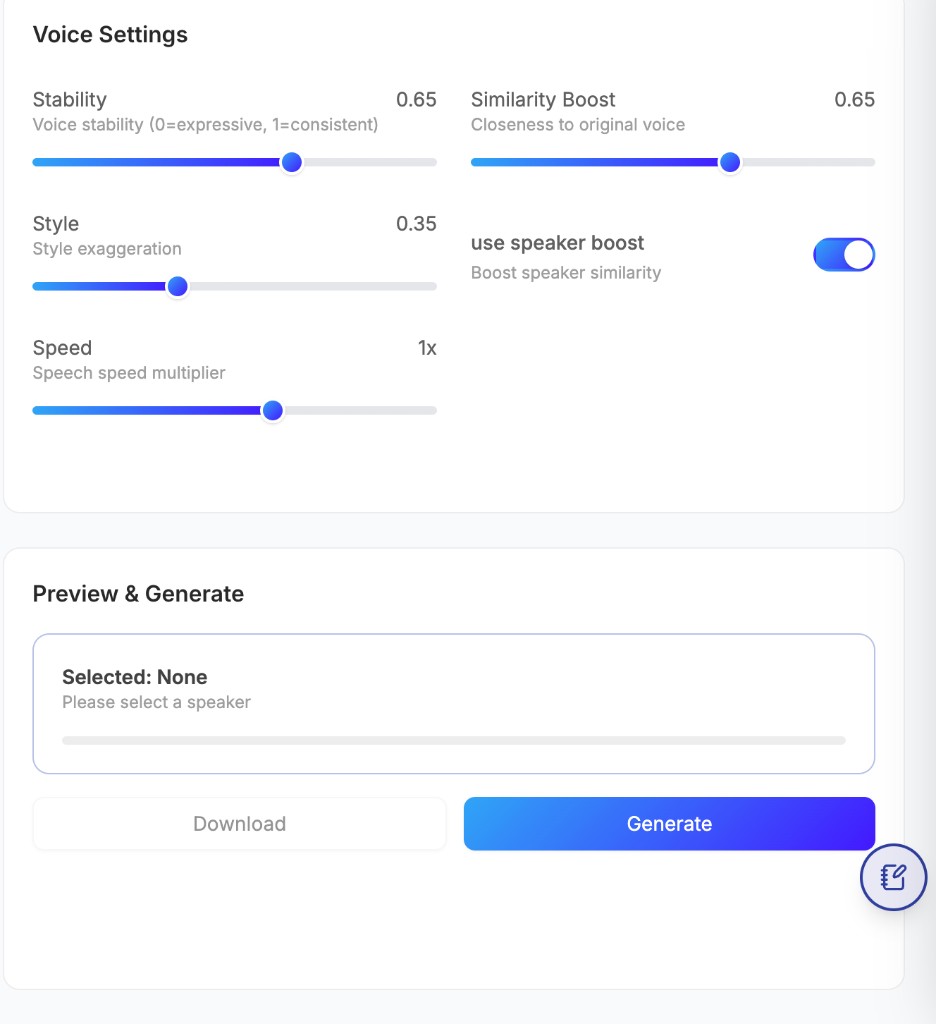
Use these controls together while iterating on the same text sample to find the right balance for clarity, naturalness, and brand tone.
Preview and generation flow
- Choose
Model,Language, andSpeaker. - Enter or paste text in the input box.
- Tune settings in Voice Settings.
- Click Generate to synthesize preview audio.
- Validate quality and download when needed.
Best practices
- Use short, representative test prompts (greeting, question, compliance line, closing).
- Validate both neutral and high-emphasis utterances before finalizing settings.
- Keep speed near natural speaking range unless the use case specifically requires faster delivery.
- Recheck pronunciation for names, product terms, and domain-specific vocabulary.
Last updated: [04/08/2026]